Synthetic Idea Pre-Screener [Beta]
Overview
The Synthetic Idea Pre-Screener gives you an independent, consumer-informed signal to help prioritise a large pool of early-stage ideas, before you invest in higher-confidence human research. It’s an important step between Concept Creation Agents, or your own idea generation solution, and Screen It/Activate It in Zappi's Innovation System.
If you have more ideas than you can feasibly test with human respondents, this tool helps you quickly narrow that pool down to a focused, high-potential shortlist. It's designed to answer the question: which ideas are worth taking into deeper research?
It's not designed to replace human research, but it helps you focus that research where it can add the most value. A smaller, stronger set of concepts advances to validation and iteration with human respondents, which means:
- Higher success rate in final testing
- Faster time to market
- More efficient research spend
When to use it
Where is Synthetic Idea Pre-Screener a good fit?
- Volume: There are “enough” ideas for narrowing them to be a real problem (note, this is reflected in the 30 stim minimum for this solution)
- Distinctiveness: The ideas are meaningfully different rather than minor variants.
- Decision type: The customer is prioritising ideas, not trying to optimise them or make a final validation decision.
- Input clarity: The stim is a product idea and is developed and expressed clearly enough to be understood and compared without further explanation.
- Batch coherence: The ideas are comparable in format, level of detail, maturity, and category context.
- Stim: early product ideas or concepts only; where you have the same basic structure and depth for text/image
Not a good fit:
- Doesn’t answer the question ‘are these ideas strong enough to take to market’.
- Not suitable to identify how to improve an individual idea.
What you'll need
- Ideas in text or text-and-image format, between 30 and 300 stims
- Category and market information
- Stim titles and a project name, for reporting.
If your concepts were created using Zappi's Concept Creation Agents, you can pick them directly and run your evaluation. If your concepts were created outside the Zappi platform, upload them via a simple Excel or CSV table with idea names, descriptions, and (if available) images in URL format.
Configuration Guide
- From the main sidebar, select the Synthetic Idea Pre-Screener icon.
-
- Choose to either upload ideas in bulk (30–300) or select generated ideas created with the Concept Creation Agent tool.
-
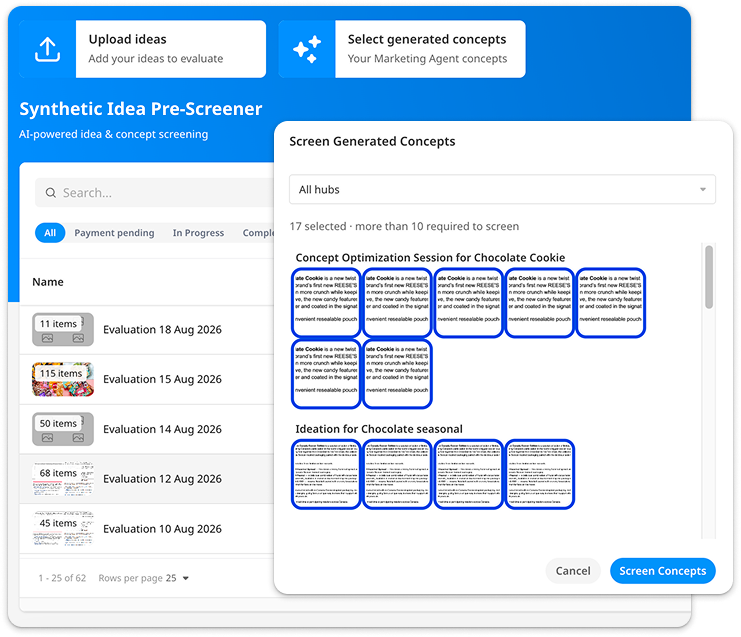
Choose from ideas generated with Concept Creation Agents 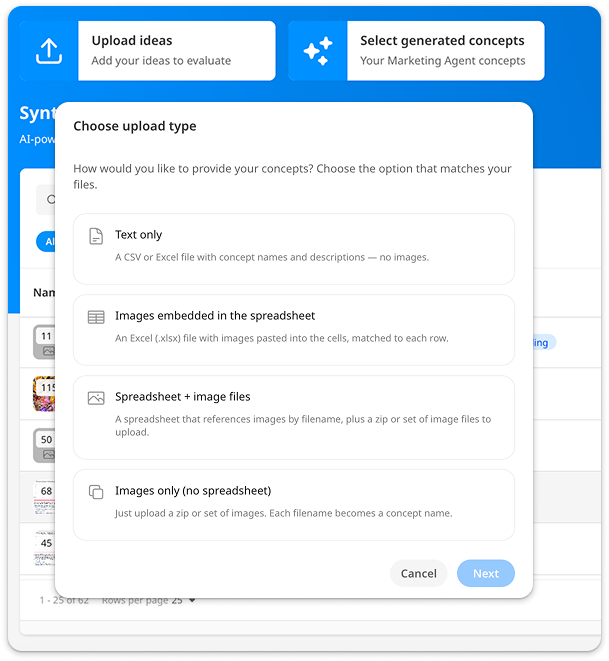
Upload from external sources If uploading, select your file format (text only, image only, or a spreadsheet with text and image) and upload a CSV or Excel (.xlsx) file
- Map your spreadsheet columns to the required fields (only the Idea/Concept Description is required)
-
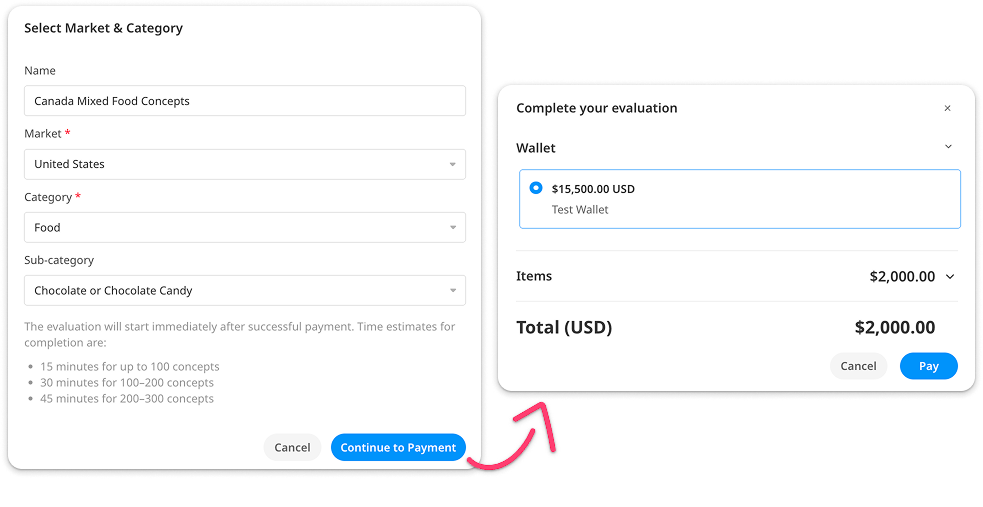
- Select your market, product category, and subcategory (optional), this helps define the right audience for evaluation. Then confirm your details and select your wallet for credit rundown.
-
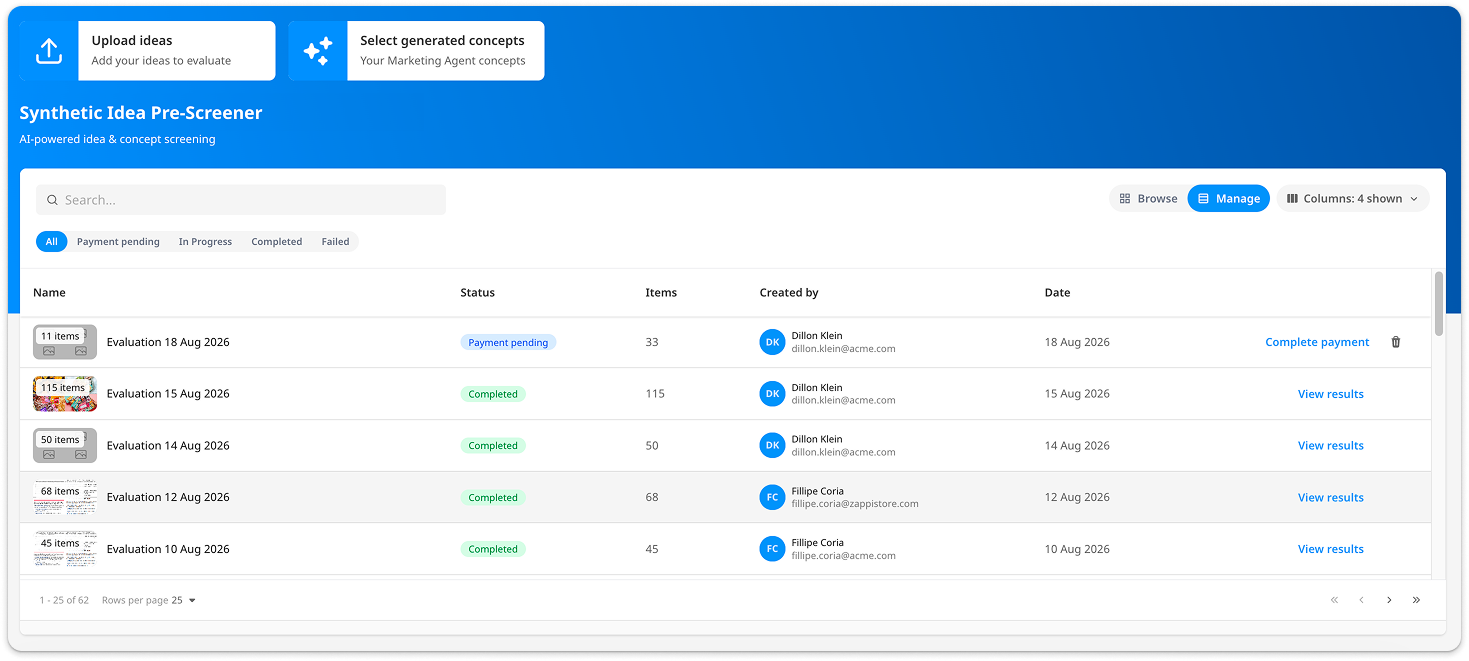
- Track your evaluation status (Running, Failed, or Completed).
-
- Once complete, view your results in a summary dashboard per project or tested batch, download them, or select ideas to move forward into Screen It or Activate It for deeper testing.
-
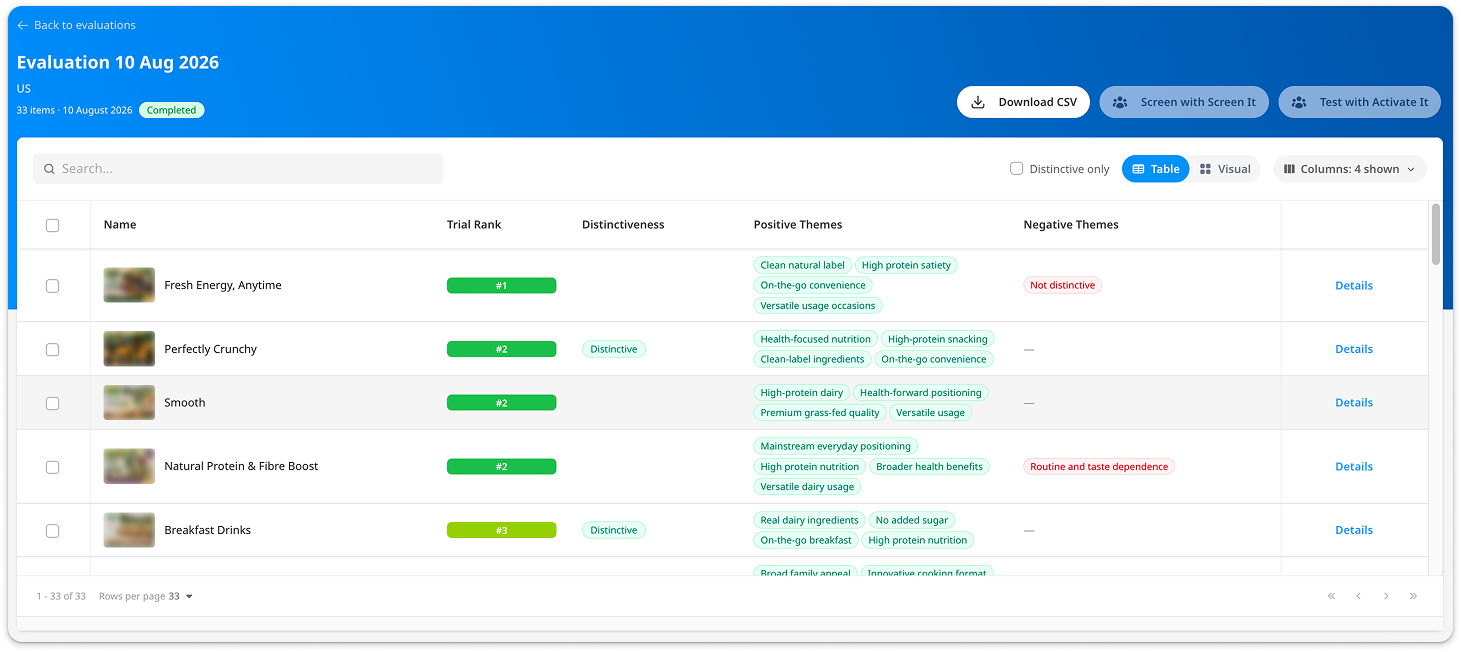
View Ranking results 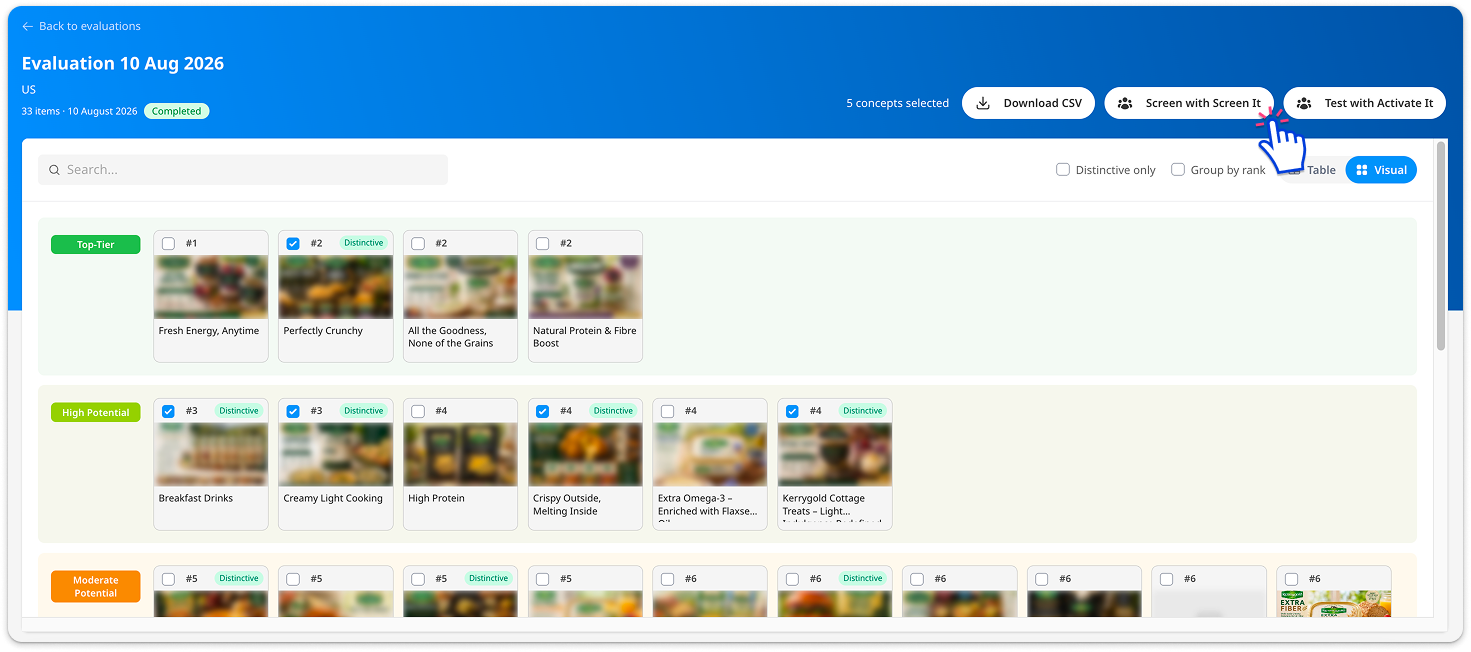
Select items to test with Screen It or Activate It
-

What you'll get back
- Purchase Likelihood tier: Each idea rated relative to the rest of the batch, based on its response to the purchase likelihood question.
- A distinctiveness flag: Highlighting the most distinctive concepts, based on response to the distinctiveness question.
- Positive/negative themes: Short thematic tags explaining the consumer response behind the rating.
Speed
Results are typically delivered in 15 minutes for sets of up to 100 ideas, and up to 45 minutes for sets up to 300 ideas.
How reliable is it?
The Synthetic Idea Pre-Screener is validated against live human respondent data (from Activate It FMCG and QSR studies) to check whether it reliably separates stronger and weaker ideas:
- 88% of concepts ranked in the top 30% by the Pre-Screener also performed high or medium in human research
- 85% of concepts ranked in the bottom 30% by the Pre-Screener also performed low or medium in human research
Validated against live human research, the Synthetic Idea Pre-Screener reliably separates meaningfully different concepts at the top and bottom of the pool, giving you confidence to use it for an early, directional decision.
This validation applies when your idea pool contains meaningfully different concepts. The tool isn't designed to detect subtle differences between near-identical variants of the same idea, those are better suited to a diagnostic or optimisation solution.
A few things worth knowing:
- Small variations can occur across identical re-runs, since each evaluation is independent.
- Keep formatting and level of detail consistent across ideas in the same batch, as this can influence results.
- Ideas that are very close in strength may show as a tie rather than a forced ranking.
When to use it in your innovation process
A concept typically travels from Ideation, to Pre-Screening, Refinement, Concept Testing, and finally Optimization, where it can be re-tested and refined before going to market.
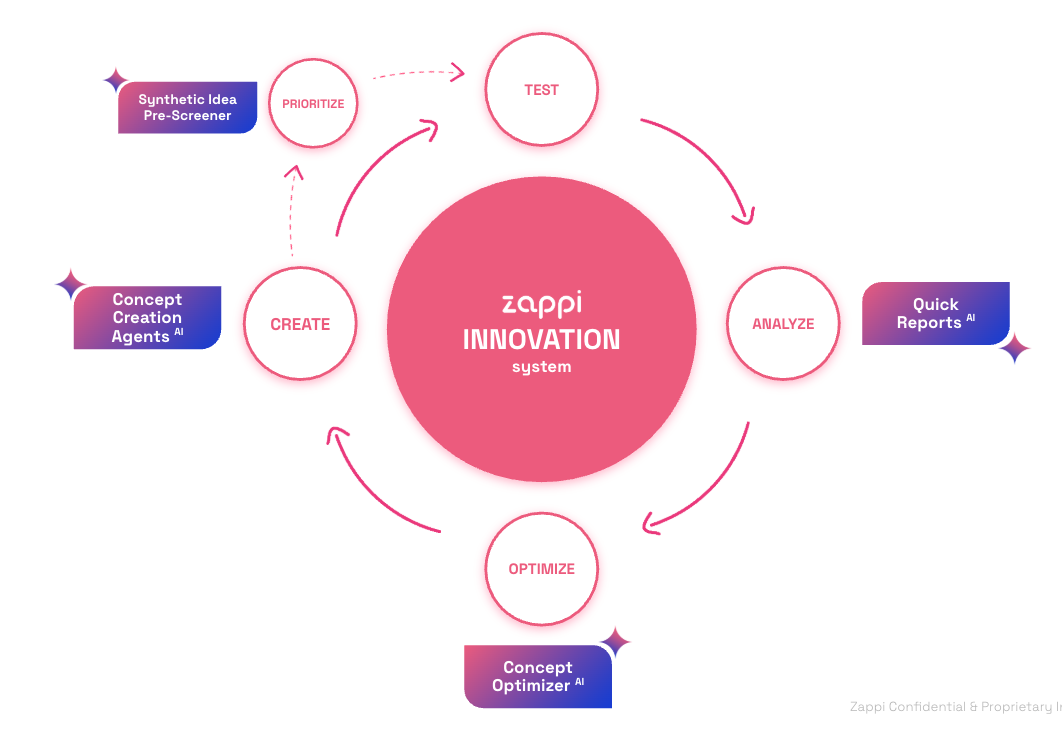
The Synthetic Idea Pre-Screener is best used right after ideation, especially if you've used Concept Creation Agents to generate a large number of concepts quickly. It helps you:
- Remove reliance on gut feel when narrowing a large set of early-stage ideas.
- Speed up slow, manual filtering of ideas.
- Screen higher volumes (up to 300) of early-stage ideas in one platform, without needing to leave your end-to-end innovation workflow.
Where it fits alongside our other solutions
|
|
Best for |
|---|---|
| Synthetic Idea Pre-Screener | Narrowing a large pool of ideas (30–300) down to the most promising, before human testing. |
| Screen It | A diagnostic, explained read on a smaller set of ideas. |
| Optimize Rank | Identifying which elements make a concept strongest. |
| Activate It Early | Understanding in-market potential of early concepts and optimizing them. |
| Activate It | Final validation ahead of launch or investment. |
Availability
- Regions: US and UK
- Categories: FMCG and QSR
- Stimulus type: Early product ideas or concepts, in text-only or text-and-image format
Data & privacy
- Your uploaded content is stored, but is not used to train any model
- Your data is not shared with third-party model providers on an ongoing basis
How do you ensure data privacy?
We are ISO 27001 certified and adhere to ISO 42001:2023 and ISO/IEC 27001 standards across our AI and data infrastructure. We follow comprehensive data security policies of multiple AI models and platforms and safeguard your information at all times. Zappi adheres to its data, privacy and security standards with respect to its use and deployment of AI models within the Marketing AgentsTM as well as the processing of any data input into them.
The Marketing AgentTM, including Concept Creation AgentsAI, do not train on your business data, you own and control your inputs at all times. Zappi does not use any customer-provided data, such as survey inputs, nor does it use research results, metadata, or respondent data to train foundational AI models. Customer data is used exclusively to deliver the services provided and is not incorporated into any general-purpose or shared AI training processes.
Each customer’s data is treated as confidential and processed in accordance with contractual terms and applicable data protection laws. Data used for AI-powered features within the Zappi platform is processed securely and only within the context of that customer's account and services. To further safeguard information, we employ an expert-maintained taxonomy system that anonymizes data while preserving categorical value, and no insights from verbatim will be surfaced.
Please see the Zappi Trust Portal as well as Zappi’s Privacy Policy for more information about Zappi’s security practices and policies.
This feature is currently in Beta. If you're interested in using it, reach out to your Zappi account team to discuss whether it's a good fit for your use case.